What keeps the wheels of a business turning? Cash flow.
Medical practices also rely on steady cash flow to support operations, invest in technology, retain staff, and deliver quality care. When cash flow slows, the ripples are felt across the organization.
Days in accounts receivable (A/R) is a key indicator of how efficiently your practice converts care to cash. While the benchmark is 40 days or less, many practices exceed it due to workflow inefficiencies.
The fastest way to reduce A/R days is to redesign workflows across the revenue cycle. Let’s explore the changes that make the biggest impact.
High days in A/R reflect compounding breakdowns across the revenue cycle. More often, they are the cumulative result of:
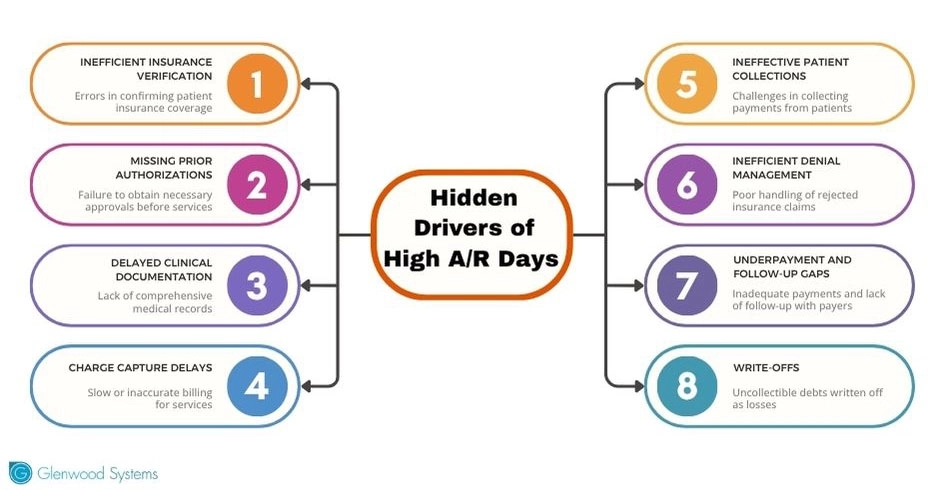
Key Factors Contributing to High A/R Days
The healthcare revenue cycle typically falls into three broad stages: front-end, mid-cycle, and back-end workflows.
Eliminating bottlenecks at every stage is imperative to reducing A/R days. Here's a breakdown.
Most denials stem from minor, avoidable errors at the front end. Experian reports that nearly one-third of claim denials arise from incorrect or incomplete patient registration data.
However, front-end fixes are the easiest way to reduce downstream delays. Here's how:
Real-time insurance verification
Verifying insurance in real time, ideally at scheduling or well before the visit, helps catch coverage issues early. Moreover, when coverage limitations or discrepancies arise, you've ample buffer time ahead of the patient visit to resolve any issues.
Digital check-in to reduce data errors
Manual data entry is prone to errors. With digital check-in, patients can verify their demographics and insurance details, reducing registration errors that can slow down billing later.
Automated prior authorization checks
Last-minute prior authorization checks increase the risk of claims denials.
Integrating AI-powered real-time checks into your scheduling workflow helps identify authorization requirements early and secure the necessary approvals.
Pre-service financial counseling
Nearly 6 in 10 people say they are concerned about rising healthcare costs.
Patients are more likely to pay when costs are communicated up front. Clear expectations around out-of-pocket costs, coverage, and financial assistance options build trust and keep balances from aging.
Upfront and flexible collections
Front-end patient collections significantly reduce A/R days. Support collections with clear cost discussions and convenient payment options. Flexible payment plans and financial assistance programs can further improve collections while reducing patient financial stress.
The mid-cycle workflow covers clinical documentation, charge capture, and coding. Delays or errors at this stage can push A/R days.
Here are the key mid-cycle workflow changes that make a real difference.
Timely and Complete Documentation
Incomplete or delayed documentation increases coding errors, denials, and unpaid services, extending A/R days. Ensure that documentation supports medical necessity and accurately reflects the care provided, using frameworks such as MEAT (Monitor, Evaluate, Assess, and Treat).
AI scribes, like GlaceScribe, automate documentation, accelerating chart completion and eliminating mid-cycle delays.
Automate coding and claim scrubbing
Automated coding eliminates manual errors by assigning accurate codes and also flagging potential code mismatches. Moreover, automated claim scrubbing tools apply payer-specific edits and validation checks to improve first-pass acceptance rates and accelerate cash flow.
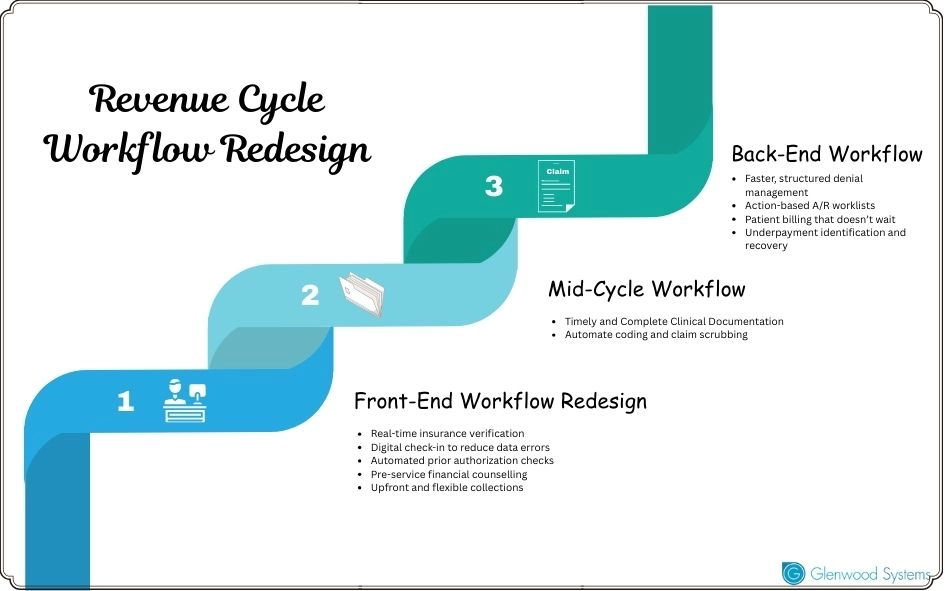
Workflow Redesign to Improve A/R Days
The back end of the revenue cycle handles claim submission, denial management, payer follow-up, and patient billing.
Redesigning the back-end revenue cycle involves:
Faster, structured denial management
Denials happen; prompt resolution makes the difference.
A more structured denial management involves:
An even more efficient option is automating denial management. AI-powered tools automatically categorize denials, track deadlines, and generate appeal letters, accelerating resubmissions and improving reimbursement.
Action-based A/R worklists
A/R management that focuses only on aging buckets often overlooks high-priority accounts. Instead, leverage action-based worklists and real-time RCM dashboards to ensure timely resolution.
Swift patient collections
The delayed statement equals bad debt. Patient billing works best when you:
Underpayment recovery
Underpayments can go unnoticed if payments aren't reconciled against contract terms. Regular audits and AI tools help identify discrepancies, recover lost revenue, and improve reimbursement accuracy.
Cash flow crunch can stall care delivery and compromise care quality. Instead of chasing delays after they appear in A/R, focus on tweaking workflows where delays actually begin.
At Glenwood Systems, we help remove friction where A/R days tend to accumulate, whether due to eligibility gaps, documentation delays, denials, or underpayments.
A/R days are a symptom. Let’s treat the cause.
Schedule a Free Consultation!


